
正则表达式入门

Chen
第一章 正则表达式简介
本教程基于b站up主:苑昊老师
教程链接:一节课精通正则表达式与re模块_哔哩哔哩_bilibili
一、基本介绍
正则表达式:Regular Expression

作用:处理复杂文本信息
灵魂:模糊查询

第二章 二元字符之通配符和字符集
一、元字符
元字符是具有特殊含义的字符。常用的11个元字符就是正则的灵魂。
二、通配符:.
通配符的作用:能匹配**==一个==**除了\n以外的任意符号
1、.:匹配一个处理\n以外的任何符号
import re

s = "apple appe a1e a2e amaze a\ne"
# 找a和e中间隔了一个字符的字符串
res = re.findall(pattern="a.e", string=s)
print(res)
输出结果:
['a1e', 'a2e', 'aze']
s = "apple appe a1e a2e amaze a\ne"
# 找a和e中间隔了两个字符的字符串
res2 = re.findall(pattern="a..e",string=s)
print(res2)
输出结果
['appe']
2、re.S模式:能够匹配\n
s1 = "aabcce abcde a\ne ace a2e"
# 设置通配符能匹配\n
res3 = re.findall("a.e",s1,re.S)
print('res3',res3)
es3 ['a\ne', 'ace', 'a2e']
三、字符集:[]
作用:匹配**==一个==**[]中的字符,[]中没有的字符不能匹配
1、应用举例
import re
s = ["alpe","ale", "ape", "a2e", "a!e", "a_e", "aae", "a\e", "ae", "a\re"]
res1 = re.findall("a.e", str(s))
print("res1=",res1)
res2 = re.findall("a[0-9a-z]e", str(s))
print("res2=",res2)
res3 = re.findall("a[lp]e", str(s))
print("res3=",res3)
运行结果:
res1= ['ale', 'ape', 'a2e', 'a!e', 'a_e', 'aae']
res2= ['ale', 'ape', 'a2e', 'aae']
res3= ['ale', 'ape']
- 如果要表示a到z:a-z
- A到Z:A-Z
- 0-9:0-9
3、应用举例:取反^
s = ["alpe","ale", "ape", "a2e", "a!e", "a_e", "aae", "a\e", "ae", "a\re"]
# 只要不是数字就提取
res4 = re.findall("a[^0-9]e", str(s))
print("res4=",res4)
输出结果:
res4= ['ale', 'ape', 'a!e', 'a_e', 'aae']
s = ["alpe","ale", "ape", "a2e", "a!e", "a_e", "aae", "a\e", "ae", "a\re"]
# 只要不是数字或者小写字母就提取
res5 = re.findall("a[^0-9a-z]e",str(s))
print("res5=",res5)
res5= ['a!e', 'a_e']
第三章 重复元字符:{}、*、+、?
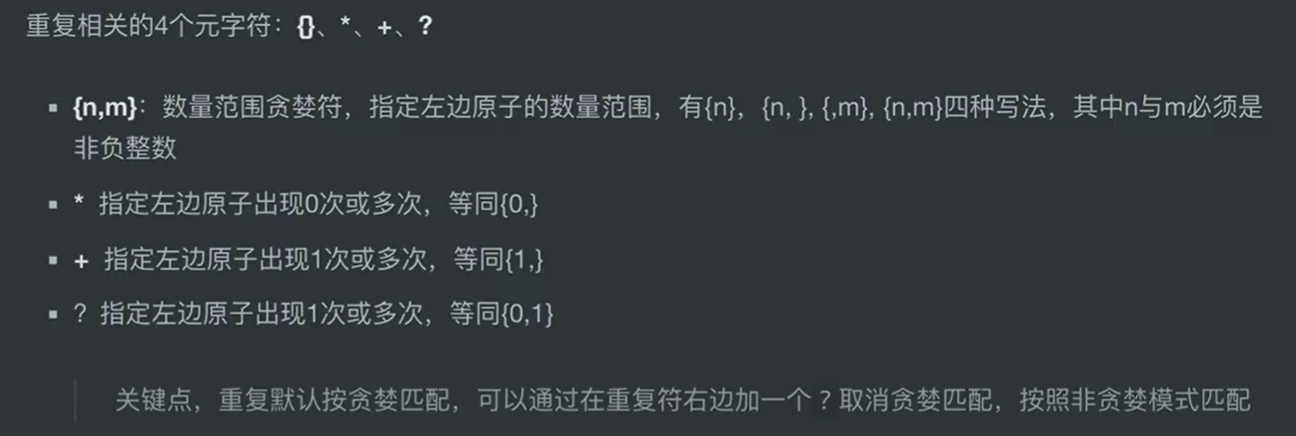
一、数量范围贪婪符{}:指定左边原子符重复的次数
假如我们要匹配:a中间三个字符e,就要写a...e,假如有一百个字符呢?不可能写一百个.吧,这个时候{}的作用就体现出来了1、
1、指定重复元素次数
s = 'abbbc abbc abc'
# 匹配ab{2,3}c
res7 = re.findall('ab{2,3}c',s)
print("res7=",res7)
res7= ['abbbc', 'abbc']
import re
s = ["aabce","aaqce", "aape", "a2e", "a!e", "a_e", "aae", "a\e", "ae", "a\re"]
# 匹配符合:a中间三个字符e,规则的字符串
res1 = re.findall("a.{3}e", str(s))
print("res1=",res1)
res1= ['aabce', 'aaqce']
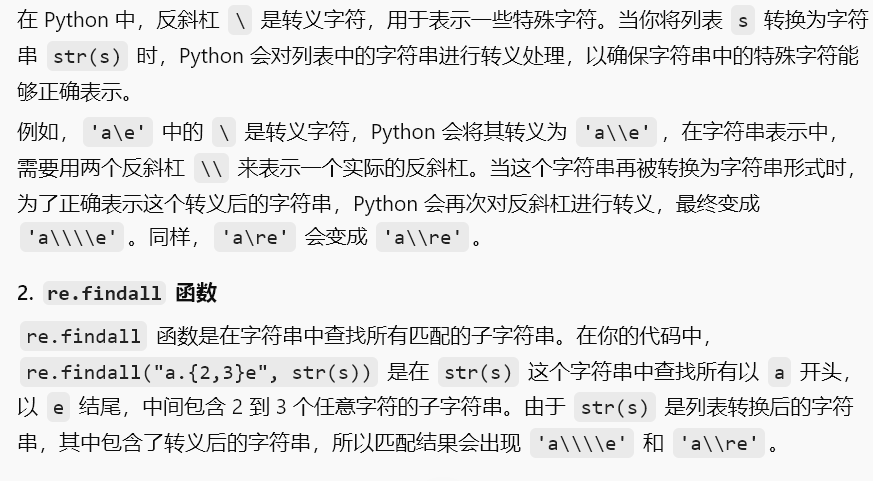
2、指定重复元素次数范围
s = ["aabce","aaqce", "aape", "a2e", "a!e", "a_e", "aae", "a\e", "ae", "a\re"]
res2 = re.findall("a.{2,3}e", str(s))
print("res2=",res2)

3、默认贪婪匹配
s1 = "aeeee"
res3 = re.findall("a.{1,3}e",s1)
print("res3=",res3)
res3= ['aeeee']
贪婪匹配:如果字符串符合多种情况,默认按能匹配的最长的匹配
4、{}?:取消重复符的贪婪匹配
贪婪匹配:如果字符串符合多种情况,默认按能匹配的最短的匹配
s1 = "aeeee"
# 选择非贪婪匹配
res4 = re.findall("a.{1,3}?e",s1)
print("res4=",res4)
res4= ['aee']
5、设置重复次数可以为无穷大
s1 = "aabcce abcde abce ace a2e"
# 重复范围:2到无穷
res5 = re.findall("a.{2,}e",s1)
print("res5=",res5)
res5= ['aabcce abcde abce ace a2e']
因为可以是无穷大且没有取消贪婪模式,所以实际上匹配的字符串是这一整个(只有一个匹配结果)

6、结合[]进行匹配
s = ["aabce","aaqce", "aape", "a2e", "a!e", "a_e", "aae", "a\e", "ae", "a\re"]
# 只匹配字母,不匹配其他字符
res6 = re.findall('a[a-z]{2,3}e',str(s))
print("res6=",res6)
res6= ['aabce', 'aaqce', 'aape']
二、*:等同于{0,}
==默认贪婪==
左边的原子符号可以出现0次或无穷次
1、应用举例:爬页面热搜新闻
细节.*?:取消贪婪匹配

三、+:等同于{1,}
==默认贪婪==
左边的原子符号可以出现1次至无穷次
1、应用案例:爬取信息是防止空的信息被爬取

四、?:等同于{0,1}
==默认贪婪==
左边的原子符号可以出现0次或1次
应用案例

这么写的话没法把http开头的网址提取出来

这样就可以了
??:取消贪婪匹配

第四章 元字符之^和$

一、开始边界符^:必须以符合规则的字符串开头
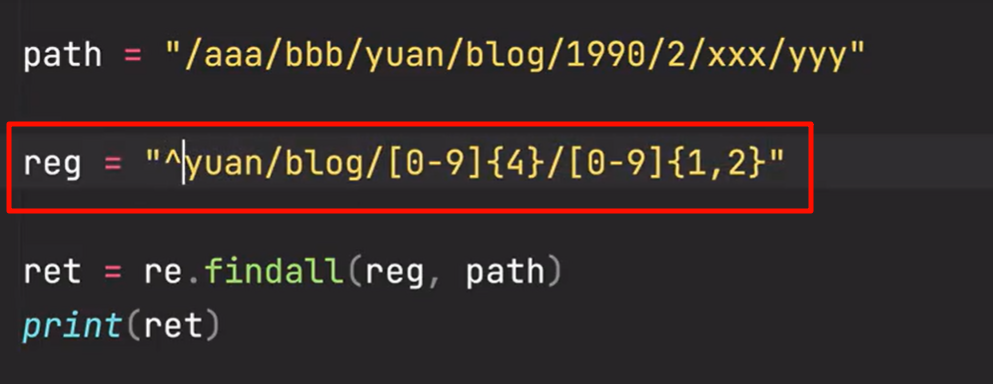
像这个path就是以不符合规则的字符串开头,所以就匹配不到
二、结束边界符$:必须以符合规则的字符串结尾
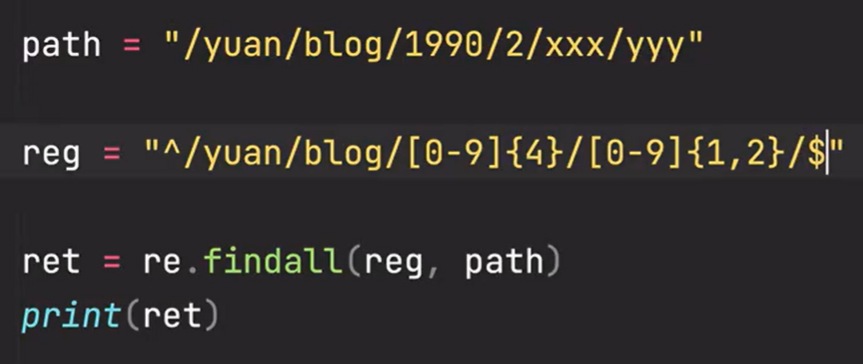
像这个path就是以不符合规则的字符串结尾的,所以也匹配不到
三、代码
import re
s = 'https://www.baidu.com/123'
res = re.findall('www.[a-z]*.com',s)
print('res=',res)

# 如果要必须以www.开头才能匹配
res1 = re.findall('^www.[a-z]*.com',s)
print('res1=',res1)


# 如果要必须以www.开头才能匹配
res4 = re.findall('^https://www.[a-z]*.com',s)
print('res4=',res4)

# 必须要以.com结尾才能匹配到
res2 = re.findall('www.[a-z]*.com$',s)
print('res2=',res2)

# 必须要以.com/123结尾才能匹配到
res3 = re.findall('www.[a-z]*.com/123$',s)
print('res3=',res3)
res= ['www.baidu.com']
res1= []
res4= ['https://www.baidu.com']
res2= []
res3= ['www.baidu.com/123']
第五章 转义符 \
一、转义符的两个功能
1、赋予某些普通符号特殊功能
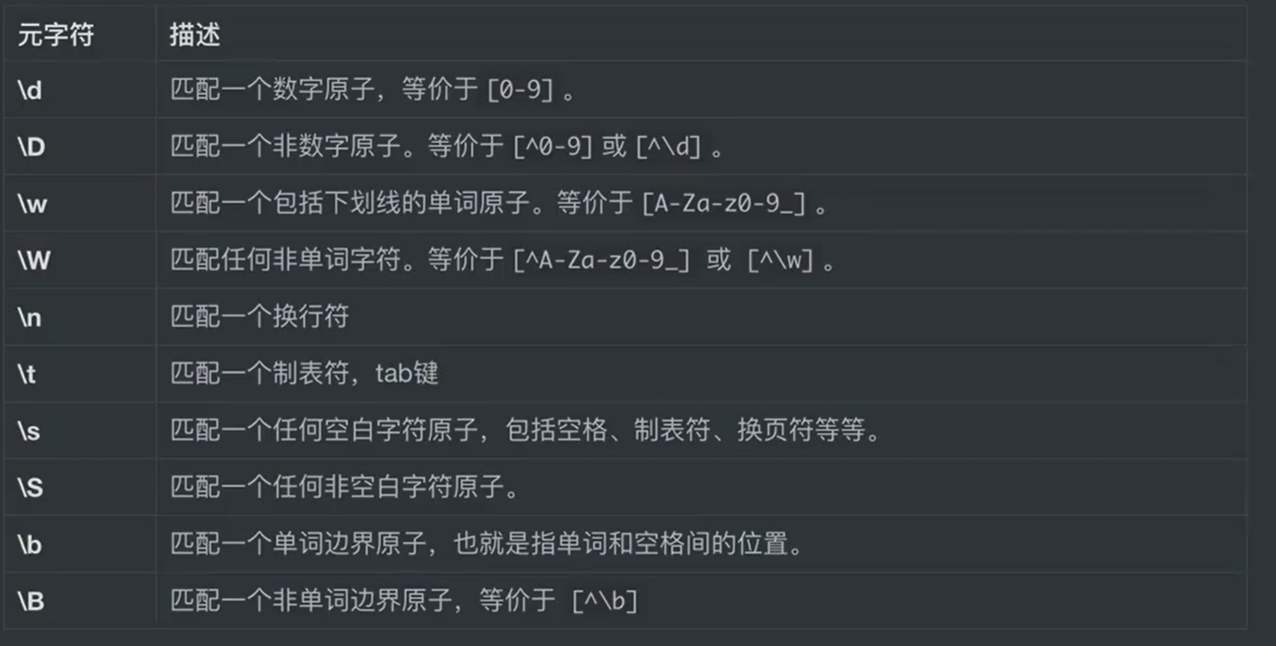
二、将特殊符号普通化
1、\\d:防止python解释器报警告
告诉python解释器\d是普通的re模块里的\d,不是python里的\d
import re
s = 'zhangsan 123 lisi 23 wangwu 9387'
res = re.findall( '\\d+',s)
print('res=',res)
res= ['123', '23', '9387']
也可以通过在规则前加r,表明这种写法是原生的
import re
s = 'zhangsan 123 lisi 23 wangwu 9387'
res = re.findall( r'\d+',s)
print('res=',res)
res= ['123', '23', '9387']
2、用\防止.被识别为通配符
s = 'wwwxbaiduxcom www.baidu.com'
res1 = re.findall('www.[a-z]*.com',s)
print('res=',res1)
res= ['wwwxbaiduxcom', 'www.baidu.com']
我们想识别的是www.和.com,但是这里的.被当做通配符了,所以要通过\来使其普通化
s = 'wwwxbaidu.com www.baidu.com'
res = re.findall(r'www\.[a-z]*.com',s)
print('res=',res)
res= ['www.baidu.com']
3、\*:提取字符串中的*,防止被识别成重复元字符
s = '*** ******* *****'
res = re.findall(r'\*+',s)
print('res=',res)

4、提取路径
s = r'\user\now\1.png,\user\now\b.png,\user\now\apple.png,\user\n.png'
# 提取\user\now文件夹下的png文件
res = re.findall(r'\\user\\now\\.+png',s)
print('res=',res)
res= ['\user\now\1.png,\user\now\b.png,\user\now\apple.png,\user\n.png']
这里是进行贪婪匹配了,直接选择了最长的符合\user\now开头png结尾的字符串!!!woc我都没意识到
需要通过?取消.+的贪婪匹配
s = r'\user\now\1.png,\user\now\b.png,\user\now\apple.png,\user\n.png'
# 使用非贪婪匹配,并且明确限定路径分隔符
res = re.findall(r'\\user\\now\\.+?\.png', s)
print('res=', res)
res= ['\user\now\1.png', '\user\now\b.png', '\user\now\apple.png']
三、\d:等价于[0-9]
import re
s = 'zhangsan 123 lisi 23 wangwu 9387'
reg = '\d+'
res = re.findall(reg,s)
print('res=',res)
res= ['123', '23', '9387']
四、\b:匹配单词边界
# \b用法
s1 = 'cat1 catyou cat! i love cat'
res1 = re.findall(r'cat\b',s1)
print('res1=',res1)
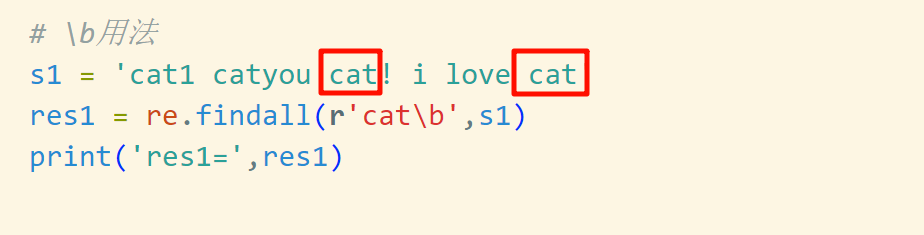
res1= ['cat', 'cat']
因为这两个cat后是单词边界,所以能被匹配出来
单词边界:只要后面跟的不是字母或者数字就说明是单词边界
第六章 元字符之()与|
一、()分组与优先提取
1、优先提取:提取@qq.com前的内容
import re
s = 'admin@qq.com sierxing@123qq.com zsw@qq.com 123@qq.com'
res = re.findall(r'\w+@qq.com',s)
print('res=',res)
res1 = re.findall(r'(\w+)@qq.com',s)
print('res1=',res1)
res= ['admin@qq.com', 'zsw@qq.com', '123@qq.com']
res1= ['admin', 'zsw', '123']
2、优先提取:爬虫提取标签内的内容
优先提取:提取括号内的内容

3、提取连续的字符串
s = 'appleappleapple appleapple apple'
# 提取连续的两个或三个apple
res = re.findall(r'(?:apple){2,3}',s)
print('res=',res)
res= ['appleappleapple', 'appleapple']
需要通过?:取消优先提取,不然在匹配到appleappleapple和appleapple后,只会提取第一个apple
s = 'appleappleapple appleapple apple'
# 提取连续的两个或三个apple
res = re.findall(r'(apple){2,3}',s)
print('res=',res)
res= ['apple', 'apple']
二、|:或
1、查找有没有apple或banana或orange
import re
s = "i love apple,banana,orange"
res = re.findall('apple|banana|orange',s)
print('res=',res)
res= ['apple', 'banana', 'orange']
如果用字符集的形式就是错的
import re
s = "i love apple,banana,orange"
res = re.findall('[apple|banana|orange]',s)
print('res=',res)
res= ['l', 'o', 'e', 'a', 'p', 'p', 'l', 'e', 'b', 'a', 'n', 'a', 'n', 'a', 'o', 'r', 'a', 'n', 'g', 'e']
import re
s = "i love apple,banana,orange"
res = re.findall('[applebananaorange]',s)
print('res=',res)
res= ['l', 'o', 'e', 'a', 'p', 'p', 'l', 'e', 'b', 'a', 'n', 'a', 'n', 'a', 'o', 'r', 'a', 'n', 'g', 'e']
2、同时匹配.com和.cn结尾的域名
# 同时匹配.com和.cn结尾的域名
s1='www.baidu.com www.sina.cn www.google.com'
res1 = re.findall('www\.\w+\.com|www\.\w+\.cn',s1)
print('res1=',res1)
res1= ['www.baidu.com', 'www.sina.cn', 'www.google.com']
3、(?:):取消优先提取
# 同时匹配.com和.cn结尾的域名
s1='www.baidu.com www.sina.cn www.google.com'
res1 = re.findall('www\.\w+\.(?:com|cn)',s1)
print('res1=',res1)
res1= ['www.baidu.com', 'www.sina.cn', 'www.google.com']
如何只提取出域名部分,在需要提取的部分添加()
# 同时匹配.com和.cn结尾的域名
s1='www.baidu.com www.sina.cn www.google.com'
res1 = re.findall('www\.(\w+)\.(?:com|cn)',s1)
print('res1=',res1)
res1= ['baidu', 'sina', 'google']
第六章 re模块中的常用函数
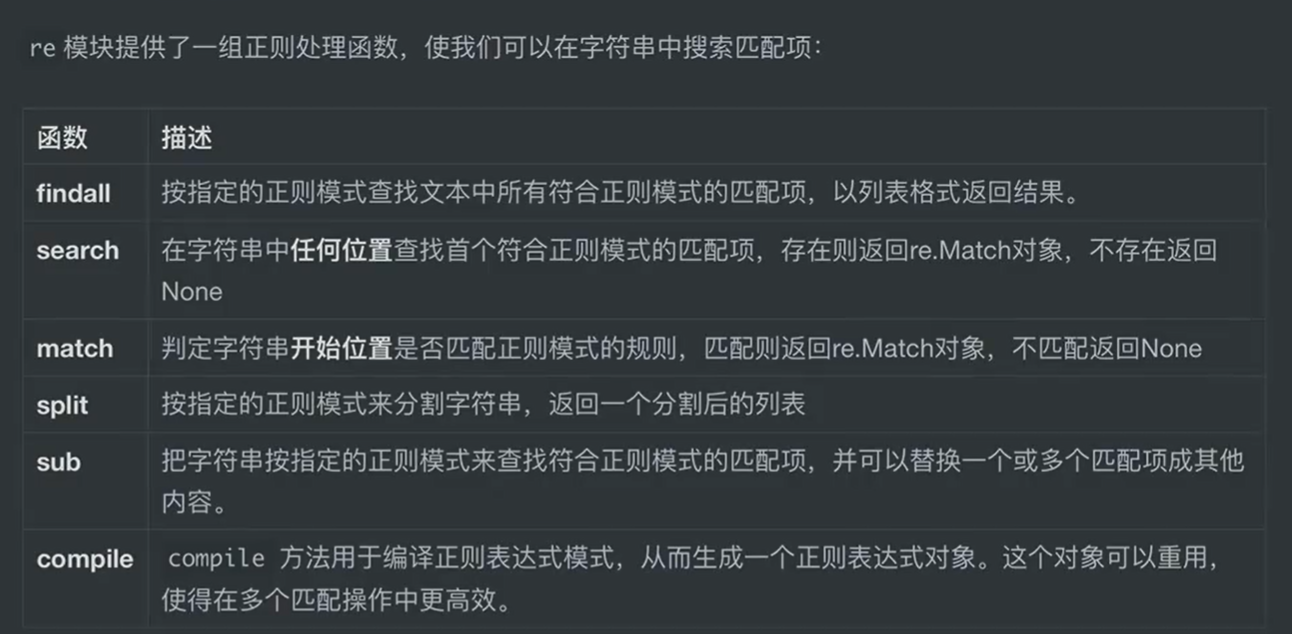
重点学习的函数:
- findall
- search
- complie
一、findall

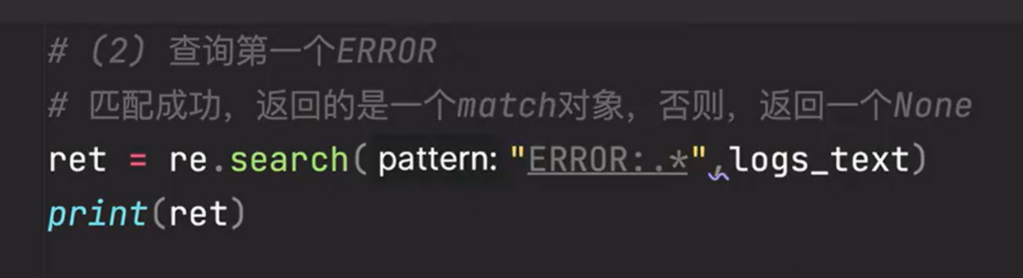
二、search
参数跟findall一样,但找的是第一个符合规则项

1、找到一个ERROR

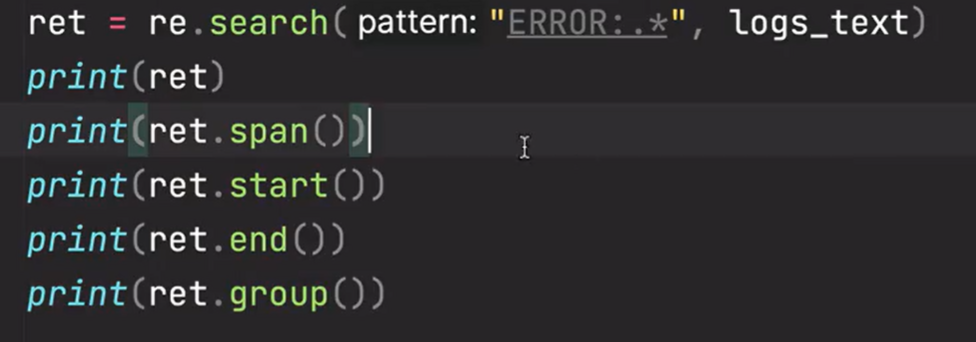
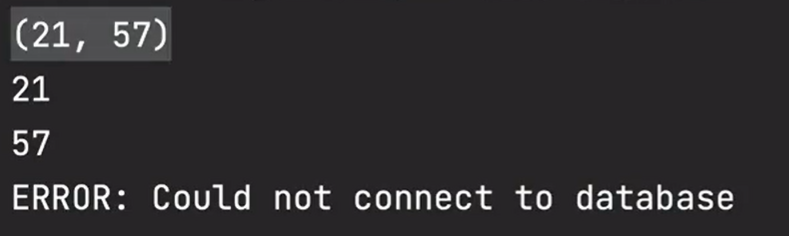
查看返回的match对象信息
2、有名提取
search函数不能使用()优先提取,但如果我们想要提取search匹配结果的某一部分,就需要给那一部分取个名字

同样用()包起来想要提取的部分,在开头协商?P<名字>
如果不使用名字提取的话就会提取整体

三、match
跟search语法一样,唯一的区别是在匹配规则相同时,match相当于在search的匹配规则前加了一个^,即只会看文本的开头是不是符合规则的字符串,是就返回,不是就返回None
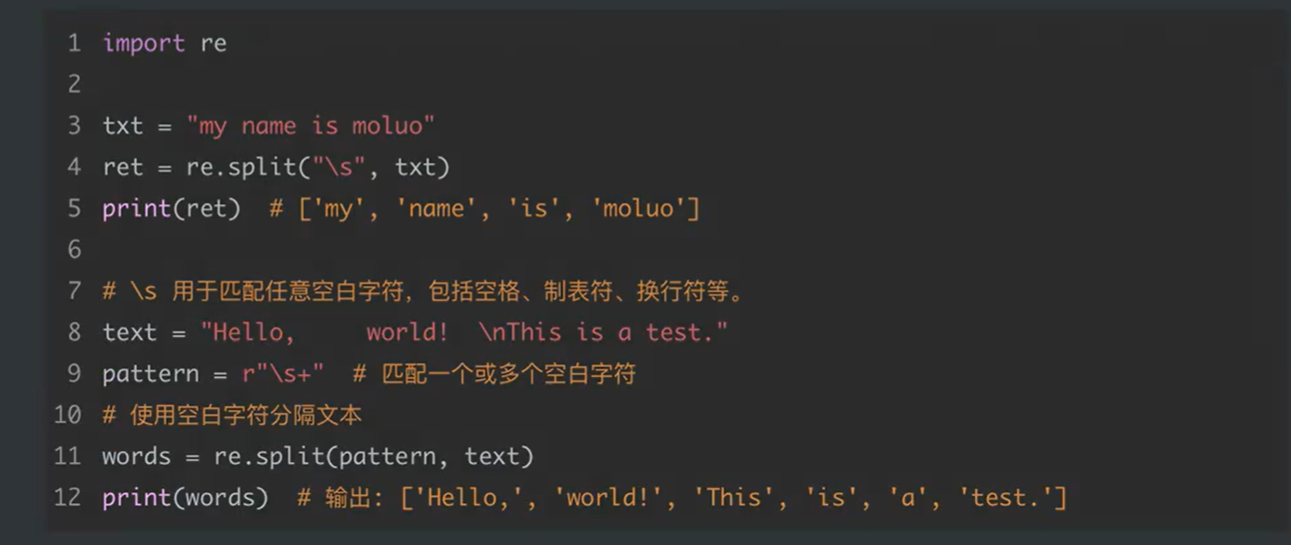
四、split

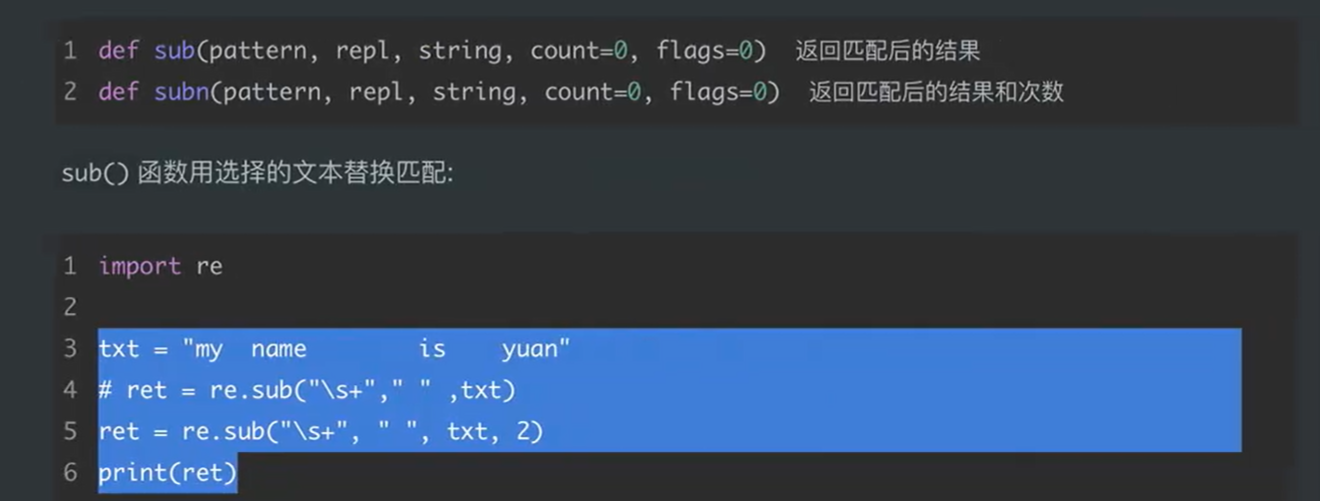
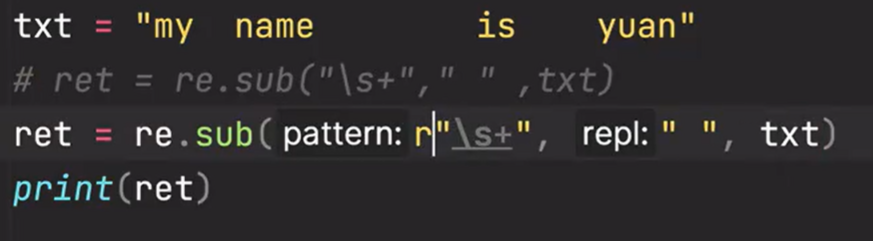
五、sub和subn

六、complie
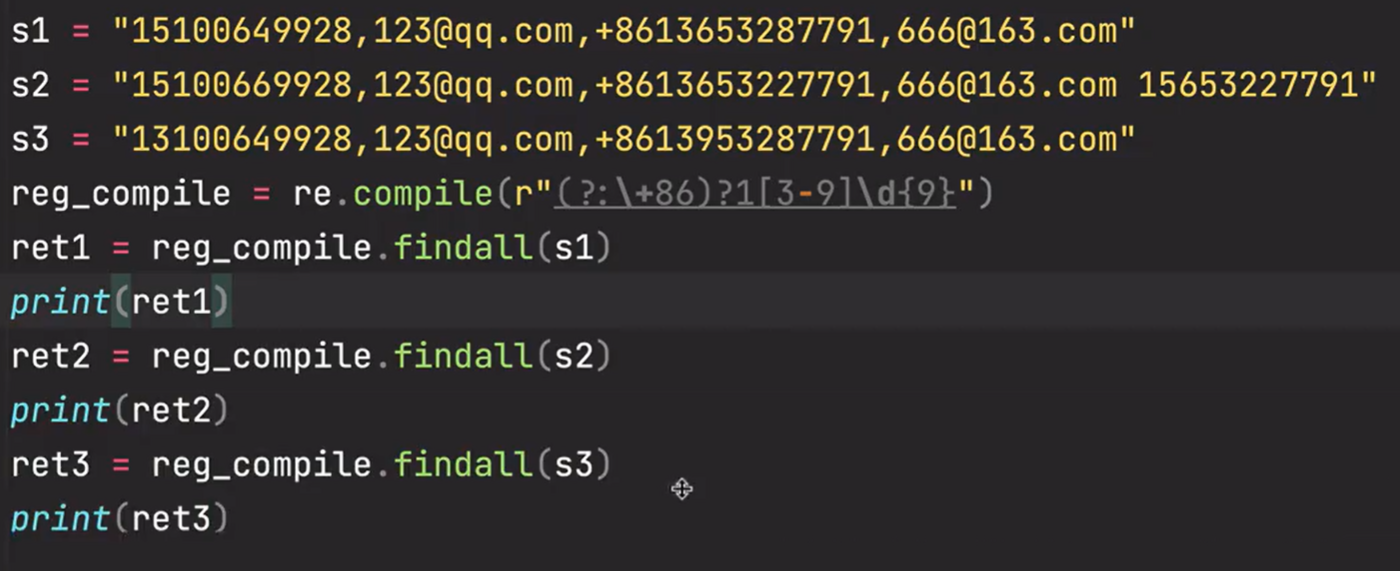
用前面的函数,每对一段文本匹配一次,就要编译一次匹配规则,如果对一百段文本匹配,就要编译一百次匹配规则,
用complie的话就只会编译一次匹配规则(一开始就把规则放到complie对象里面),然后用这个规则对一百段文本进行匹配,可以极大的提高性能
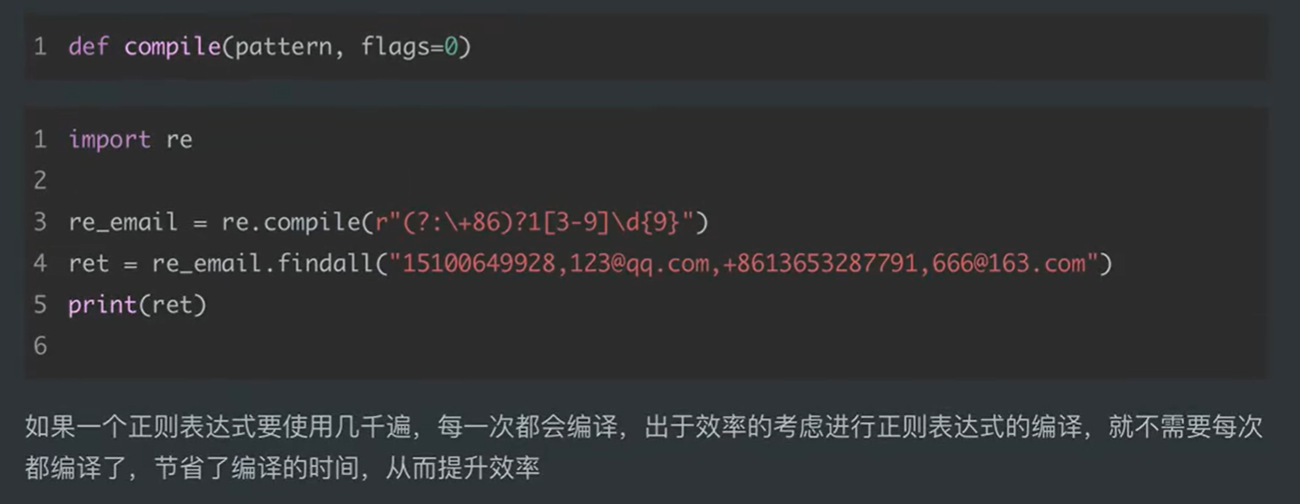

1、用complie对象对多个文本进行匹配